

W-2 Extractor
Pull Every Field from Any W-2
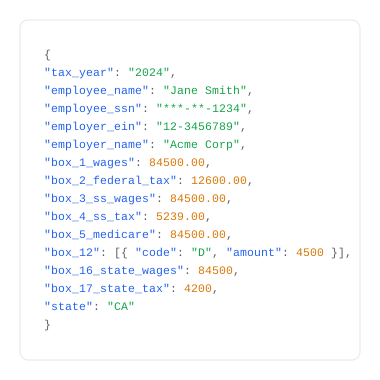
Upload a W-2 PDF or image via the FormX REST API or web tool. Extract wages, withholdings, state and federal taxes, employer EIN, and all Boxes 1–20 as structured JSON — no templates, works on ADP, Paychex, Gusto, and Workday-generated W-2s.
What does this Form W-2 Extractor do?
How the W-2 Extractor Works

Upload Form W-2

Extraction

Download
Use Cases

Mortgage & Lending

Accounting & Tax Firms

HR & Payroll Teams

Background Screening & Income Verification

Financial Services & Banking
W-2 vs 1099 — What's the Difference?






Get started with FormX.ai
Frequently Asked Questions
What does this W-2 extractor do?
This form W-2 parser is a tool that automatically reads IRS Form W-2 and pulls out the data inside each box field, including wages, withholdings, employer details, and state tax information, without manual data entry. FormX uses OCR and AI to extract and structure W-2 data in seconds. Get in touch to learn more!
What W-2 fields does FormX extract?
FormX extracts all standard W-2 fields: Box 1 through Box 20, including wages, federal and state tax withholdings, Social Security and Medicare data, Box 12 codes (401k, HSA contributions, etc.), and header information including employer EIN, employee name, and tax year. Schedule a Demo to see how simple it is to automate W-2 Form extraction.
What file formats does the W-2 extractor accept?
FormX accepts PDF, JPG, and PNG. This includes scanned paper W-2s, photographs taken on a phone, and digitally generated PDFs from payroll systems like ADP, Paychex, Gusto, and Workday. Multi-copy W-2 layouts (2-up, 4-up) are supported. Contact us for integrating with different tools to automate your process.
Is it free to extract W-2 data?
Yes, the free tier allows single W-2 extraction with no signup required. Batch processing of multiple W-2s and API access require available with a FormX account. Reach out to us and we can create a pre-setup demo account for you.
Is it safe to upload W-2 forms?
FormX is ISO 27001 and SOC 2 Type II certified. All uploaded documents are encrypted in transit (TLS 1.2+) and at rest (AES-256). Documents are not retained after extraction. Read our data privacy policy for more.
Can FormX extract W-2 data via API for batch processing?
Yes. FormX provides a REST API that accepts W-2 PDFs and returns structured JSON. API documentation is available at here. You can also customise extracted fields through the FormX portal.
What is the difference between a W-2 and a 1099, and can FormX extract both?
A W-2 is issued by employers to employees and reports wages and tax withholdings. A 1099 is issued to independent contractors and reports non-employment income. FormX extracts data from both form types. If you receive 1099s alongside W-2s, FormX can process them within the same workflow.
Contact us to setup a trial account for you.
What is the best W-2 parsing API?
The FormX W-2 parsing API accepts PDF, JPG, and PNG — including scanned and phone-photographed W-2s — and returns all 20 boxes as structured JSON in under 3 seconds. Handles multi-state W-2s, multi-copy layouts (2-up, 4-up), and corrected forms automatically. See our API documentation to get started.
Who uses a W-2 extraction API?
Tax preparation firms processing high volumes at filing season, mortgage lenders verifying borrower income, payroll platforms ingesting employee tax documents, and HR systems automating onboarding. FormX integrates with ADP, Workday, Paylocity, Gusto, and QuickBooks Payroll.