

P60 Converter
P60 Extraction API and OCR SDK — Pull Every Field Automatically
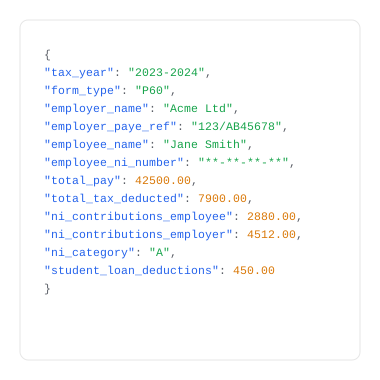
Use the FormX P60 extraction API or OCR SDK to read HMRC P60 forms instantly. Returns total pay, tax deducted, National Insurance contributions, NI category, statutory payments, and employer PAYE reference as structured JSON or CSV — no templates required.
What does this P60 Converter do?
How the P60 Converter Works

Upload

Extraction

Download
Use Cases

Mortgage & Remortgage Applicants

Accounting & Tax Firms

HR & Payroll Teams

Lettings & Rental Applications

Financial Services & Banking






Get started with FormX.ai
Frequently Asked Questions
What does this P60 converter do?
A P60 converter is a tool that automatically reads HMRC Form P60 and converts every field - total pay, tax deducted, National Insurance contributions, and employer details - into structured data without manual entry. FormX uses OCR and AI to convert P60 data into Excel or JSON in seconds. Get in touch to learn more!
What P60 fields does FormX extract?
FormX converts all standard P60 fields including employee name and NI number, employer name and PAYE reference, total pay, total tax deducted, employee and employer NI contributions, NI category letter, statutory payments, and student loan deductions. Schedule a Demo to see how simple it is to automate P60 form extraction.
What file formats does the P60 converter accept?
FormX accepts PDF, JPG, and PNG. This includes scanned paper P60s, photographs taken on a phone, and digitally generated PDFs from payroll software such as Sage, Xero, QuickBooks, and ADP. Contact us for integrating with different tools to automate your process.
Is it free to convert P60 data?
Yes - the free tier allows single P60 conversion with no signup required. Batch processing of multiple P60s and API access require a free trial account. Reach out to us and we can setup a demo account for you.
Is it safe to upload P60 forms?
FormX is ISO 27001 and SOC 2 Type II certified. All uploaded documents are encrypted in transit (TLS 1.2+) and at rest (AES-256). Documents are not retained after conversion. Read our data privacy policy for more.
Can FormX extract P60 data via API for batch processing?
Yes. FormX provides a REST API that accepts P60 PDFs and returns structured JSON - making it a P60 extractor suitable for enterprise integration. The API connects with Sage, Xero, Workday, BambooHR, Microsoft Dynamics 365, Zapier, and N8N. API documentation is available at here. You can also customise extracted fields through the FormX portal.
What is the difference between a P60 and a P45?
A P60 is issued by your employer at the end of each tax year (5 April) and summarises your total pay and tax for that year. A P45 is issued when you leave a job and shows your pay and tax up to your leaving date. FormX can process both document types.
Can I tailor what I need to extract from P60 forms?
Yes. FormX lets you customise exactly which fields to extract and how the output is structured.
Contact us to setup a trial account for you.
Is there an API for extracting P60 data?
Yes. The FormX P60 extraction API accepts PDF and image uploads and returns all HMRC P60 fields as structured JSON — employee name, NI number, employer PAYE reference, total pay, tax deducted, NI contributions by category, statutory payments, and student loan deductions. Integrates with Sage, Xero, BambooHR, Workday, and Microsoft Dynamics 365. Get in touch to set up API access.
What is a P60 OCR SDK?
A P60 OCR SDK lets you embed P60 data reading directly into your application without sending documents to a web interface. FormX provides SDKs for Python, Node.js, Java, and .NET. See our API documentation to get started.
What is the difference between a P60 converter and a P60 extraction API?
A P60 converter outputs a file (Excel or CSV) for manual use. A P60 extraction API returns structured JSON you can feed directly into payroll software, HR systems, or tax platforms without any manual reformatting. FormX supports both use cases.
What is P60 document AI?
P60 document AI refers to using machine learning and large language models to understand and extract structured data from HMRC P60 forms — going beyond simple OCR to correctly identify fields regardless of layout or formatting differences between payroll software providers. FormX uses this approach to achieve >95% accuracy across Sage, Xero, QuickBooks, and ADP-generated P60s.